VAT is one of the most misunderstood areas of running a Shopify store in the UK. Get it wrong and you're either under-charging (which means you owe HMRC money out of pocket), over-complicating checkout for B2B buyers, or confusing customers with prices that don't make sense. Get it right and your store looks professional, compliant, and trusted — by both consumers and business buyers.
This guide covers the full picture: UK VAT rates and registration, what changed after Brexit, how to configure Shopify VAT settings correctly, and how to handle the B2B vs B2C pricing split that trips up so many growing stores.
UK VAT basics every Shopify merchant needs to know
Before touching any settings, you need to understand what you're actually configuring. UK VAT has three rates and one important threshold.
The three VAT rates
- Standard rate — 20%: Applies to most goods and services. If you're unsure which rate applies, start here.
- Reduced rate — 5%: Covers specific categories including children's car seats, mobility aids, and some energy efficiency products.
- Zero-rated — 0%: Books, newspapers, children's clothing and shoes, and most food are zero-rated. You still charge VAT — it's just 0%. The distinction matters because you must still report zero-rated sales on your VAT return.
HMRC publishes a searchable list of VAT rates by product type. If your store sells across categories — say, clothing that includes both adult and children's items — you may be applying more than one rate and need to configure product-level overrides in Shopify.
The registration threshold
You must register for VAT once your taxable turnover exceeds £90,000 in any rolling 12-month period. Before that threshold, registration is optional — but not always a bad idea. Registering early lets you reclaim VAT on business purchases (input VAT), which can be meaningful if you're buying inventory or equipment.
If you're below the threshold and unregistered: you don't charge VAT to anyone, regardless of where they are. The moment you register, that changes entirely.
UK, Great Britain, and Northern Ireland — why the distinction matters
The UK consists of England, Scotland, Wales, and Northern Ireland. "Great Britain" refers only to England, Scotland, and Wales. Ireland (the Republic) is a separate country and EU member — it follows EU VAT rules entirely.
Northern Ireland occupies a unique position: it follows UK VAT rates and reports to HMRC, but follows EU VAT rules for the movement of goods across the Irish border (under the Windsor Framework). This affects how you handle exports from Northern Ireland to EU customers — and it's different from how the same export works if you're shipping from Manchester.
How Brexit changed Shopify VAT rules (and what it means now)
Before January 2021, the UK operated within the EU VAT system. That ended with Brexit. UK businesses now manage VAT under HMRC rules, and EU-to-UK trade is treated as international trade — not intra-EU movement.
Selling from Great Britain to EU consumers (B2C)
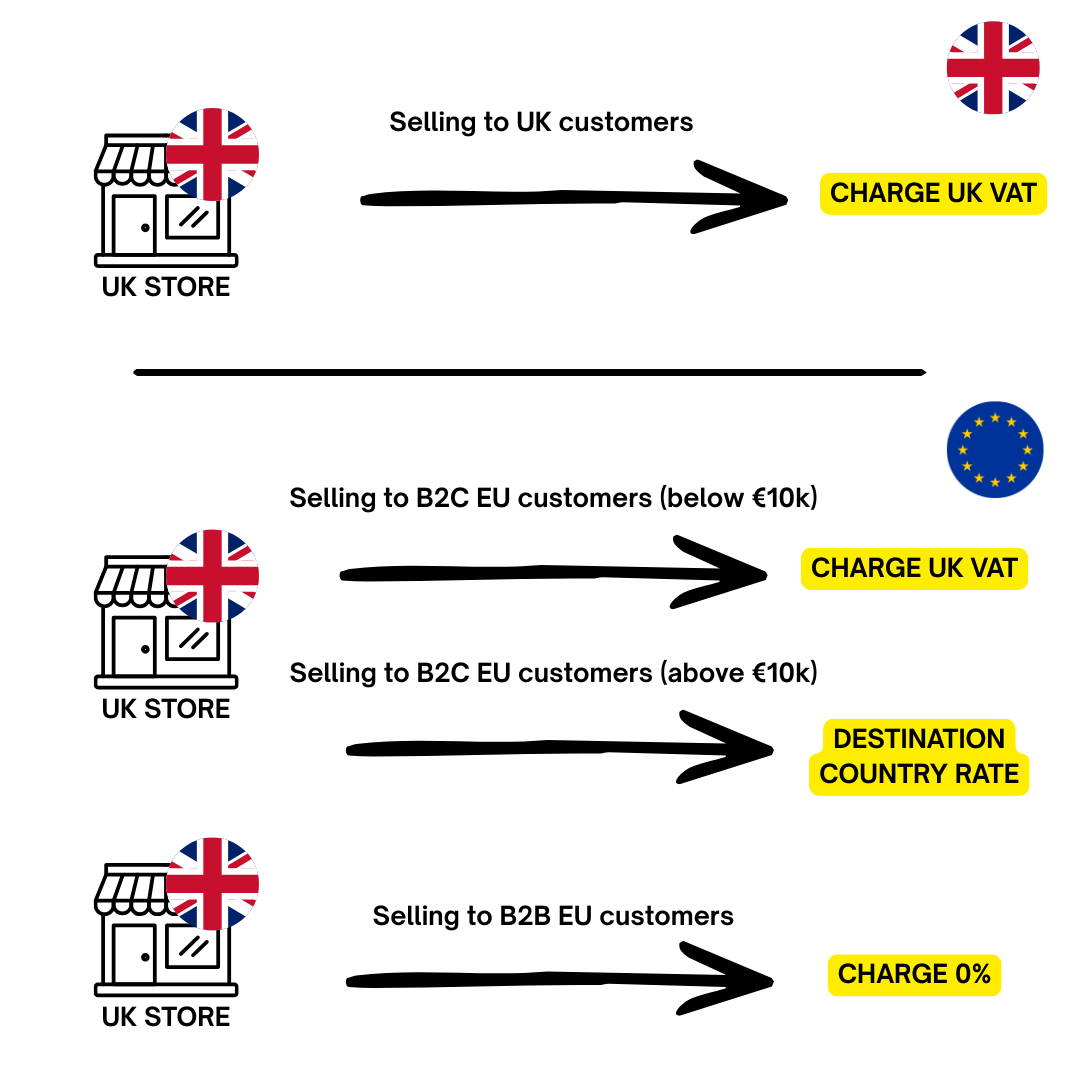
These are called "distance sales." The EU applies an €10,000 threshold (approximately £8,800) across all EU member states combined. Below this: charge UK VAT as normal. Above it: you must register for VAT in each EU country where your sales exceed the threshold — or use the EU's One Stop Shop (OSS) scheme.
The OSS Union scheme is the practical choice for most UK merchants selling to multiple EU countries. You register in one EU member state, charge each customer their country's VAT rate, and submit a single OSS return instead of managing separate registrations across 27 countries. Shopify supports per-country VAT registrations, so once you have your OSS registration in place, you can configure it in your tax settings.
Selling from Great Britain to EU businesses (B2B)
Most GB-to-EU B2B sales are zero-rated. The EU buyer handles their domestic VAT via the reverse charge mechanism. You still need to report these sales on your UK VAT return and keep evidence that the goods left the UK (proof of shipping, export documentation).
Digital services: a separate set of rules
If you sell physical goods through Shopify — even if the order is placed online — those are classified as goods, not digital services, and the usual rules above apply. Digital services (streaming, software subscriptions, digital downloads) follow different rules: there is no registration threshold for UK sellers providing digital services to EU individuals. Each sale is taxable at the destination country's VAT rate from the first transaction.
Most Shopify product stores don't need to worry about this, but it's worth knowing if you sell digital downloads alongside physical goods.
Shopify VAT settings: where to configure everything
Shopify's tax configuration lives in one place: Admin → Settings → Taxes and duties. Here's what to set up, in order.
Step 1: Register your UK VAT number
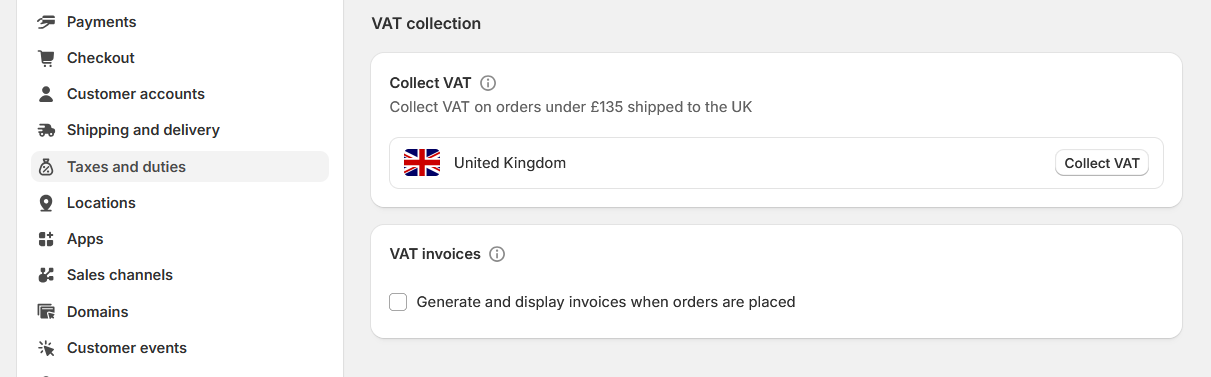
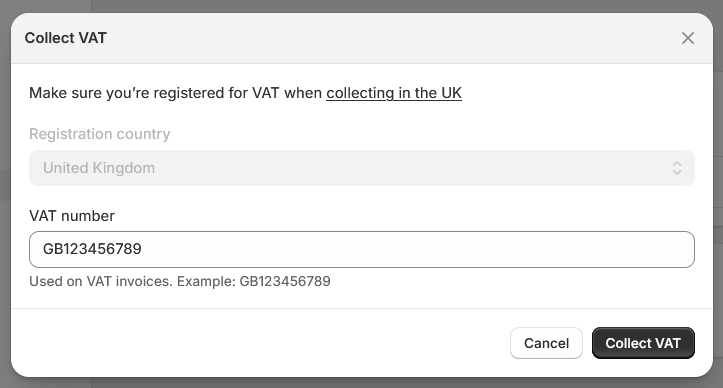
Under "Tax registrations," click Add United Kingdom and enter your HMRC VAT registration number. This is what switches Shopify into VAT-charging mode for UK sales. Until you do this, Shopify will not calculate UK VAT — even if your store is set to GBP.
Step 2: Decide on "include tax in price"
This setting determines whether your listed product price is VAT-inclusive or exclusive:
- Enabled (recommended for B2C UK stores): The price shown on product pages already includes VAT. A £60 product includes £10 VAT. UK consumer protection law requires that prices shown to consumers be VAT-inclusive.
- Disabled (common for B2B stores): Tax is added as a line item at checkout. The listed price is ex-VAT. Better for wholesale and B2B stores where buyers expect net prices.
The challenge comes when you serve both consumers and businesses — more on that below.
Step 3: Configure zero-rated and reduced-rate products
Go to a specific product → scroll to the Pricing section → click "Tax override." Set the rate to 0% for zero-rated goods (books, children's clothing) or 5% for reduced-rate goods. This overrides the default 20% for that product only.
Step 4: Add EU VAT registrations (if applicable)
If you're registered for VAT in EU countries or using OSS, add each registration under the same Tax registrations section. Shopify will then apply the correct destination-country rate to EU customers automatically.
Step 5: Collecting VAT numbers from B2B customers
Standard Shopify does not have a native field to collect or validate customer VAT numbers at checkout. Shopify Plus offers B2B company management which supports this. For non-Plus stores, this typically requires an app or a custom checkout extension.
B2B vs B2C on Shopify: handling VAT-exempt customers
This is where most mixed-audience stores run into trouble. A consumer buying a product for personal use expects to see a price that includes VAT. A business buyer — who will reclaim that VAT anyway — expects to see the net (ex-VAT) price. Showing the wrong format to either group creates friction.
Why B2B buyers expect ex-VAT prices
For a VAT-registered business, VAT is a passthrough cost: they pay it to you, then reclaim it from HMRC. What actually matters to their purchasing decision is the net price. If you show a B2B buyer a £120 inc-VAT price when competitors show £100 ex-VAT, you look 20% more expensive — even though you're not.
For cross-border EU B2B sales (zero-rated), showing an inc-VAT price is also technically incorrect: no VAT should apply at all.
Shopify's native B2B capabilities
Shopify Plus includes a B2B feature that lets you create company accounts, assign contacts, and build separate price catalogs — including catalogs with tax excluded. If you're on Plus and have a meaningful B2B segment, this is the cleanest native option.
Standard Shopify has no native mechanism to treat individual customers as VAT-exempt or to switch price display based on customer type. The common workaround is to use an app that either:
- Asks customers to identify as B2B or B2C (via a popup or toggle), then adjusts what price format they see.
- Validates a customer's VAT number and switches to ex-VAT display automatically.
VAT number validation
Accepting a customer's claim that they're VAT-registered without verifying it is a compliance risk. For EU customers, you can validate VAT numbers via the VIES portal. For UK businesses, HMRC provides its own VAT number checker. Valid VAT numbers are the legal basis for zero-rating B2B cross-border sales.
How to show prices with and without VAT on Shopify
Shopify's default pricing display gives you a binary choice: show the price with tax baked in, or show it without tax and add it at checkout. For many stores that serve both B2B and B2C customers, neither default works well on its own.
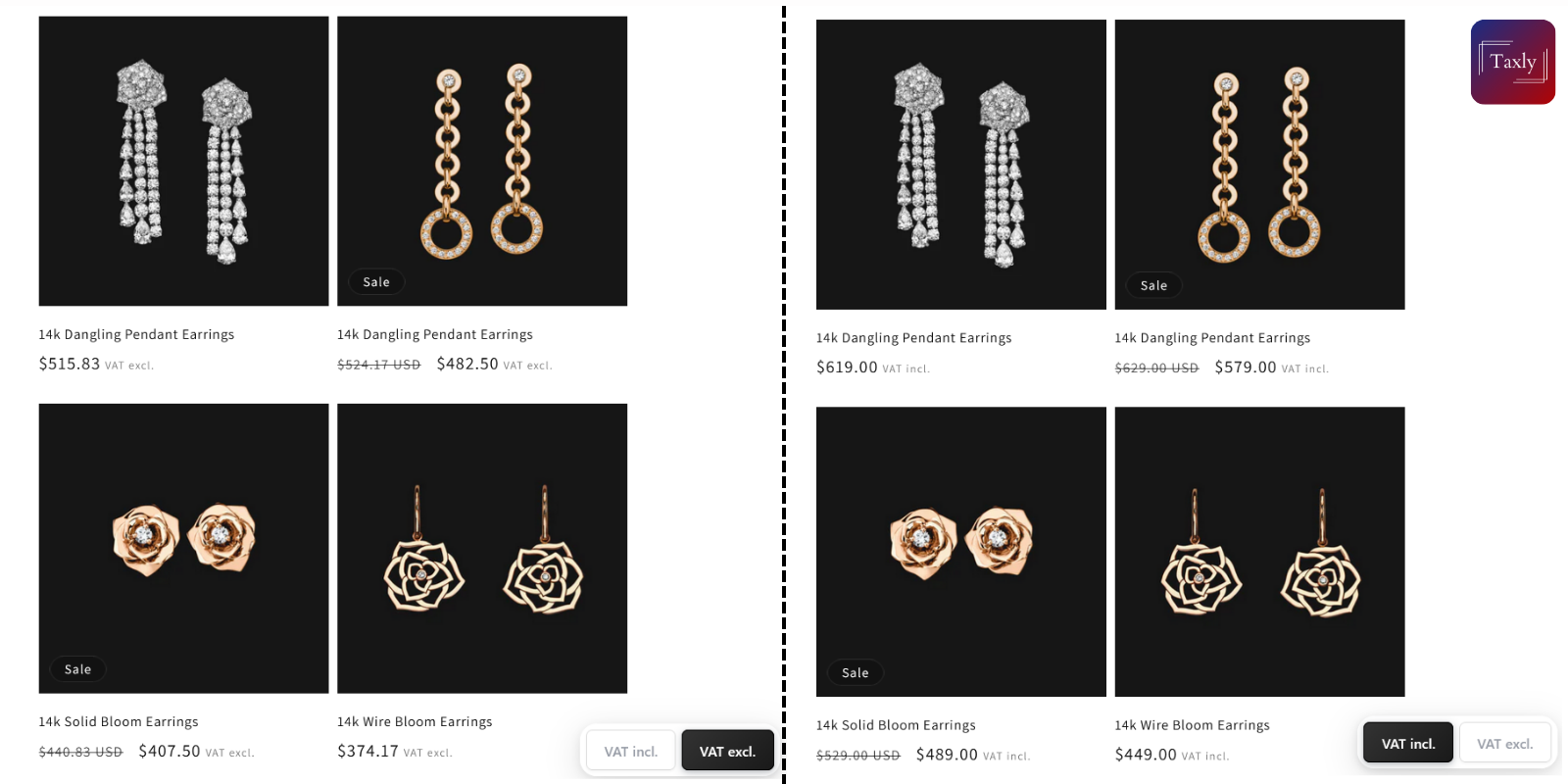
What merchants actually need is the ability to show both prices on the same product page — for example: "£120.00 inc. VAT (£100.00 ex. VAT)" — or a toggle that lets the customer switch the display based on their purchasing context.
Option 1: Liquid theme code
You can edit your theme's Liquid files to calculate and display a second price. The logic is straightforward — divide the price by 1.2 to get the ex-VAT amount — but this approach has limitations: it hardcodes the VAT rate, doesn't adapt per product or per customer, breaks when theme updates overwrite your changes, and doesn't handle reduced-rate products cleanly.
Option 2: App-based VAT display
An app handles the dynamic logic: it reads the correct VAT rate per product, shows both prices wherever you configure it (product page, cart, collections), and can switch the display based on customer type — without touching theme code.
Multi-language VAT label translation
If your store uses Shopify Markets or a multi-language setup to serve customers in different countries, VAT labels need translation too. "inc. VAT" means nothing to a French or German customer — they expect "TVA incluse" or "inkl. MwSt." Shopify's built-in translation handles product content and storefront text, but custom VAT display strings typically require configuration at the app or theme level.
Taxly: VAT Switcher — VAT display without the developer time
For stores that need more control over how VAT is displayed — without custom theme development — Taxly: VAT Switcher is built specifically for this use case.
It handles the VAT display layer that Shopify leaves unaddressed:
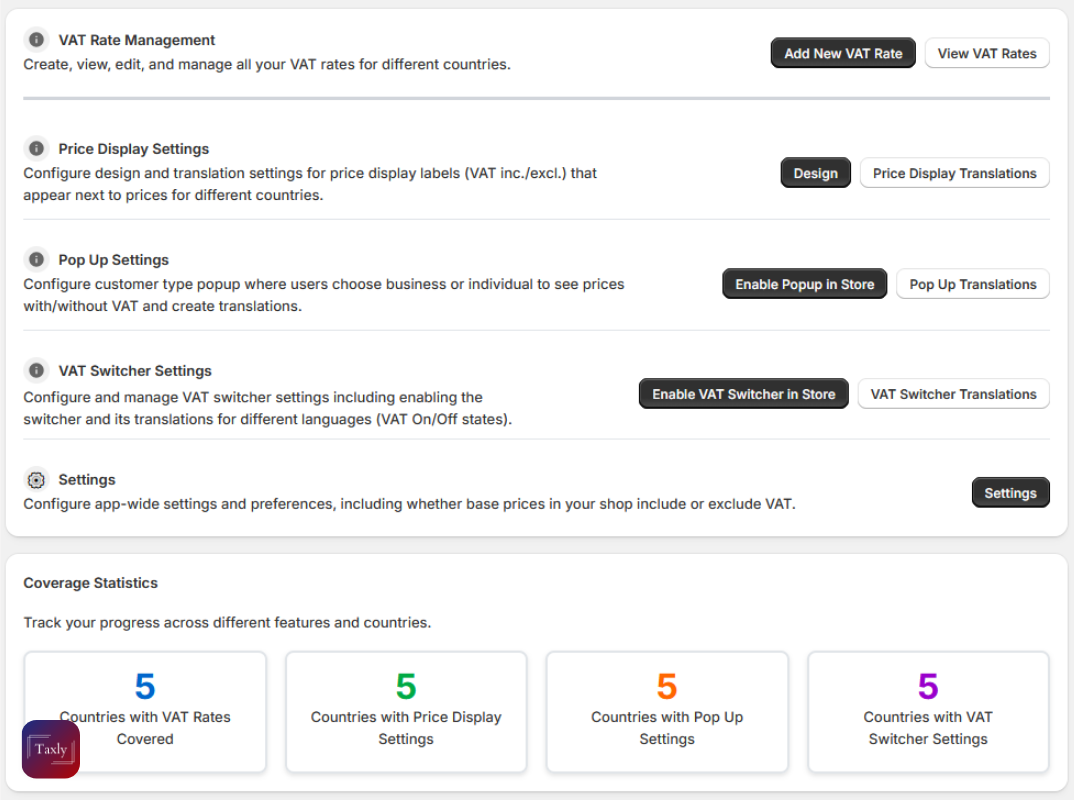
- Show inc-VAT and ex-VAT prices simultaneously on product pages and the cart — no code required.
- B2B / B2C popup toggle: Prompt visitors to identify their customer type. The app remembers their choice and adjusts pricing display accordingly.
- Country and product-specific VAT rules: Apply the correct rate per product category and customer location — including zero-rated and reduced-rate overrides.
- Multi-language support: Translate VAT labels for each language your store supports.
- Appearance customisation: Match the price display styling to your theme — font, colour, position, and label format.
It's particularly useful for UK stores with a wholesale or trade channel alongside a consumer storefront — where the same product needs to present its price differently depending on who's looking.
Common UK VAT mistakes on Shopify stores
Most VAT problems on Shopify aren't caused by misunderstanding the rules — they're caused by misconfiguration after a business change. These are the ones worth checking.
Not updating Shopify after VAT registration
The most common (and costly) mistake. If you hit the registration threshold and register with HMRC but forget to add your VAT number in Shopify's tax settings, you continue selling without collecting VAT — but you owe it to HMRC. That gap comes out of your margin. Check your tax settings the same day you receive your VAT registration confirmation.
Showing the same price format to B2B and B2C customers
A single-format price page frustrates one group or the other. B2C customers expect an all-in price. B2B buyers want to see the net figure. If your store serves both, a dual-price display or customer-type toggle removes the ambiguity and reduces pre-purchase questions.
Missing zero-rating on qualifying products
Charging 20% VAT on a product that qualifies as zero-rated means you're overcharging customers — and potentially creating a VAT accounting error. Children's clothing, books, and most unprocessed food are zero-rated. If your store carries these categories, configure the product-level override in Shopify and document the basis for zero-rating in your records.
Treating Northern Ireland the same as Great Britain for EU exports
If you ship goods from Northern Ireland to EU customers, you're subject to EU VAT rules for that movement — not standard GB export treatment. This catches merchants off guard, particularly those who've recently expanded operations into Northern Ireland or who dropship from suppliers based there.
Not issuing VAT-compliant invoices for B2B sales
Shopify's default order confirmation email is not a valid VAT invoice. B2B customers need a proper document showing your VAT registration number, their VAT number (for EU cross-border sales), a line-level breakdown of VAT, and the applicable rate. If your B2B buyers are asking for "a VAT invoice," this is what they mean. You'll need an invoicing app or integration to generate HMRC-compliant documents automatically.
FAQ: Shopify VAT for UK merchants

Do I need to charge VAT on my Shopify store?
Only if your business is VAT-registered with HMRC. Registration is mandatory once your taxable turnover exceeds £90,000 in any rolling 12-month period. Below that threshold it's optional — but registering voluntarily lets you reclaim input VAT on stock and business purchases.
How do I add my VAT number to Shopify?
Go to Shopify Admin → Settings → Taxes and duties → Tax registrations → Add United Kingdom. Enter your HMRC-issued VAT registration number. Shopify will then apply UK VAT to applicable sales automatically.
What VAT rate should I charge on Shopify?
Most goods: 20% (standard). Specific categories like children's car seats and mobility aids: 5% (reduced). Books, children's clothing, newspapers, and most food: 0% (zero-rated). Use HMRC's VAT rate checker to confirm the correct rate for each product category you sell.
Can Shopify show prices with and without VAT at the same time?
Not natively. Shopify either includes tax in the listed price or adds it at checkout — it does not display both simultaneously. An app like Taxly: VAT Switcher adds dual-price display (inc. and ex. VAT) to product pages and the cart without theme code changes.
How do I set up B2B VAT-exempt pricing on Shopify?
On Shopify Plus, use the native B2B company accounts feature to assign tax-exempt price catalogs. On standard Shopify, you need a third-party app that detects a customer's VAT number or business identity and adjusts their price display or tax treatment accordingly.
Does Shopify handle EU VAT after Brexit?
Shopify supports per-country EU VAT registrations and can apply destination-country rates automatically. For the OSS scheme, configure your registered EU country's details under Tax registrations. Shopify does not natively validate EU VAT numbers — that requires a separate integration or app.
How do I show prices excluding VAT on Shopify product pages?
Disable "Include tax in price" in Settings → Taxes and duties. This shows ex-VAT prices on product pages and adds VAT at checkout. For stores that need to show both prices, or that switch the display based on customer type, an app that manages the display layer is more reliable and flexible.
What is the Northern Ireland VAT situation on Shopify?
Northern Ireland applies UK VAT rates but follows EU rules for the movement of goods (under the Windsor Framework). Goods shipped from Northern Ireland to EU customers are subject to EU VAT treatment — different from goods shipped from England, Scotland, or Wales. If you're based in Northern Ireland, consult HMRC guidance or a VAT adviser for your specific circumstances.
Selling to both consumers and business buyers?
If your store needs to show VAT-inclusive prices to B2C customers and net prices to B2B buyers — or display both on the same page — Taxly: VAT Switcher handles the display layer without theme code or developer involvement.